
Best Practices for Expired Inventory
Managing expired inventory is crucial for maintaining operational efficiency and compliance. Here’s how you can effectively track and manage expired inventory using the AccuSite portal and AccuShelf/AccuVax.
Viewing Expired Inventory via AccuSite Portal
- Log in to your My.AccuVax.com portal
- Navigate to Dashboard and select Enterprise or Site in blue drop down
- Enterprise Dashboard provides visibility across all sites
- Site Level Dashboard provides visibility for specified location selected
- Expired on-hand Item bucket displays the total dose count and a quick link for the Full Report containing all item details associated
Alternative option to access this report: navigate to Inventory > Enterprise or Site > On Hand > Expired
Important Note: The two red hyperlink filters, Expired and Recalled are considered “Unavailable” for dispense and are filtered apart from your dispensable on hand inventory items.
Viewing Expired inventory via AccuShelf and AccuVax
- Login to your AccuShelf or AccVax
- Select Inventory > View
- Similar to the portal you will see an Expired bucket to view all expired inventory


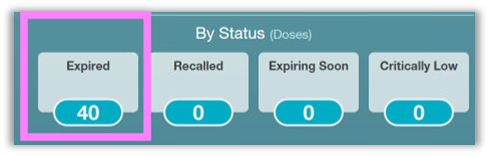
Important Note: Expired items are considered “Unavailable” for dispense and are filtered apart from your dispensable on hand inventory items found in specific program buckets.
Removing Expired Inventory
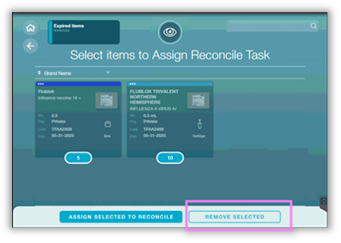
Once you have identified the expired inventory, follow these steps to remove it from your on-hand inventory at the AccuShelf or AccuVax
- Select Expired Items: select all the inventory items you wish to remove
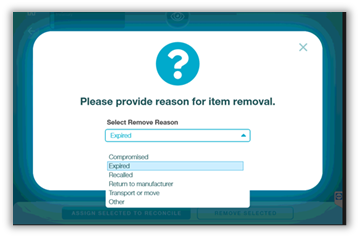
- Follow the prompts for the removal process: include the reason, Expired, for appropriate documentation
- Confirm Removal
Best Practices
- Regular Inventory audit: Include identification of Expired and Soon to Expire in your regular inventory checks.
- Set Alerts: AccuSite can provide alerts for expired and soon to expire inventory to help you stay informed
- Training: Ensure that the appropriate staff members are trained on how to access and manage expired inventory effectively.
By following these best practices, you can maintain a more efficient inventory system and reduce waste associated with expired products.
Reference videos for removing expired inventory from AccuShelf and AccuVax
Thank you for your continued support. Please reach out to Product@TruMedSystems.com for questions or suggestions.